

Workflows
The workflows are used to automate things in the platform.
How to use
To open the Workflows view, navigate to Develop ➔ Workflows.
Designer
Fields in the sidebar
- UUID - Is the unique identifier of the row in the table (read-only).
- Module - Specify if the entity is contained in a module.
CODE tab
In this space, you can write code that defines the logic and functionality of your workflow. It uses a language similar to Java to express your instructions clearly. Declare variables to store and manipulate data within your workflow. Variables are essential for data handling and flow control. Foreach loops enable you to iterate over collections, such as lists or arrays, to perform repetitive tasks efficiently. Easily integrate external packages and functions into your workflow to extend its capabilities and access additional functionality.
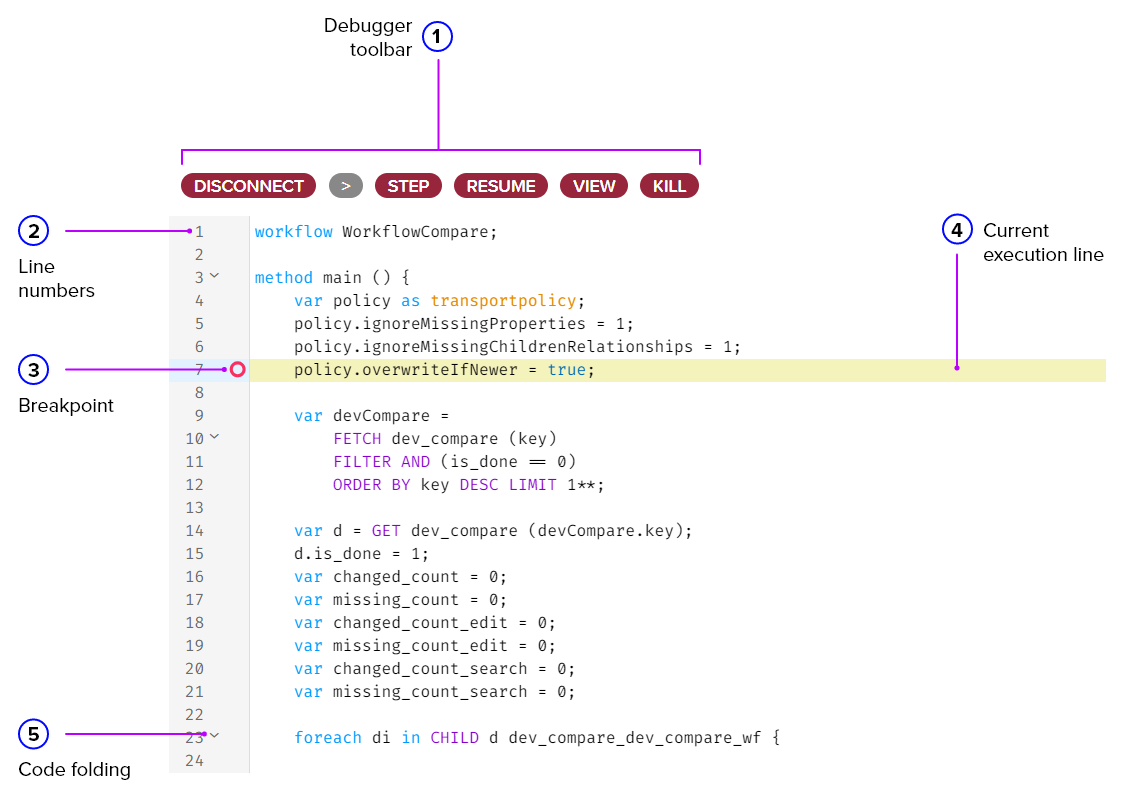
On the upper, you have the button used for debugging.
- Debug - It starts listening to what will come first and will stop at the first breakpoint.
- > - Runs manually a function or method that is selected. If nothing is selected it runs the function with name "main".
- Step - It goes on the next line.
- Resume - It let the code go on until it finishes or until it hits the next breakpoint.
- Kill - It stops the code, rolling back if it was atomic, but does not let the code run any further.
LISTENERS tab
In this tab you will see if there are any listeners created for this workflow. Ussualy they are not created manually.